Google Drive vs Google One: What's the Difference?
Google Drive is the file storage service. Google One is the paid plan that gives you more of it. Here's exactly how they differ and which one you actually need.
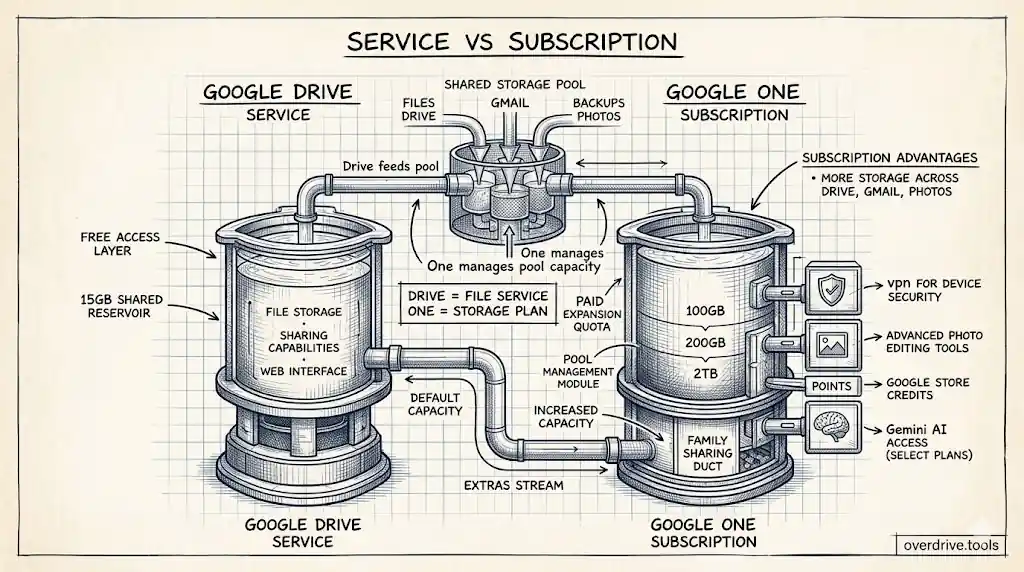
Google Drive and Google One are two different things, but they're easy to confuse — especially when Google sends you a storage warning and you're trying to figure out what to upgrade. Google Drive is the file storage and sharing service that comes free with every Google account. Google One is the paid subscription that gives you more storage. You're almost certainly already using Google Drive. Google One is what you buy when 15 GB isn't enough.
What Google Drive Is
Google Drive is Google's cloud storage and file management service. It's where you store documents, photos, spreadsheets, PDFs, and any other files you want accessible from any device. Every Google account gets Google Drive automatically, with 15 GB of free storage included.
That 15 GB isn't exclusive to Drive files. It's shared across three services simultaneously: Google Drive files, Gmail messages and attachments, and Google Photos backups. So if your inbox has 8 GB of old emails, Drive and Photos share whatever's left.
Google Drive itself is not a subscription — it's a core Google service like Gmail. You don't pay for Google Drive. What you pay for (if you need more space) is Google One.
What Google One Is
Google One is Google's paid storage subscription. When you upgrade to Google One, you're not getting a new product — you're expanding the same storage pool that Drive, Gmail, and Photos already share. A 100 GB Google One plan gives you 100 GB total across all three services, replacing the default 15 GB.
Google One plans (US pricing as of 2026):
| Plan | Storage | Monthly | Annual |
|---|---|---|---|
| Basic | 100 GB | $2.99 | $29.99 |
| Standard | 200 GB | $3.99 | $39.99 |
| Premium | 2 TB | $9.99 | $99.99 |
| Higher tiers | 5 TB–30 TB | varies | varies |
All plans let you share your storage with up to 5 family members through Google One's Family Sharing feature. Each family member gets their own private storage within the shared pool — they don't see each other's files.
What Google One Includes Beyond Storage
Depending on the plan, Google One subscriptions include extras beyond just more storage:
All Google One plans:
- Storage expansion across Drive, Gmail, and Photos
- Google One app for storage management
- Ability to share storage with up to 5 family members
- Google Store purchase credits (varies by region and plan)
Premium (2 TB) and above:
- Google VPN for device security on public Wi-Fi
- Enhanced Google Photos editing features (Magic Eraser, Portrait Light, etc.)
- Access to Google's AI features (Gemini Advanced on some plans)
The VPN and AI features have made Google One increasingly a bundle product rather than pure storage, but for most people, the storage expansion is still the primary reason to subscribe.
The Confusion: "Upgrading Google Drive"
When people say they're "upgrading Google Drive," they usually mean they're buying a Google One plan. Google itself sometimes uses this framing, which adds to the confusion. The storage limit shown in Google Drive's interface is your Google One quota — if you see "15 GB," you're on the free tier; if you see "100 GB," you have a Google One Basic plan.
You manage Google One at one.google.com, not within Google Drive itself. The storage counter in Drive reflects whatever Google One plan (or lack thereof) your account has.
Do You Need Google One?
Whether you need Google One depends entirely on your storage usage. The 15 GB free tier is sufficient for many people who primarily use Google Docs and Sheets (which don't count toward storage before June 2021 — though new edits after that date do count), who keep Gmail lean, and who don't back up photos in Original quality.
The most common situations where 15 GB runs out:
Google Photos backup: If you back up photos and videos from your phone in Original quality, years of photos can consume the entire 15 GB. Switching to Storage saver quality significantly reduces Photos storage usage, which may make the free tier sufficient again.
Gmail accumulation: Years of emails with attachments, automated reports, and large files sent and received all count against storage. A full inbox audit can sometimes recover several gigabytes.
Work-heavy Drive use: Uploading large files (PDFs, videos, presentations, project archives) fills storage faster than people expect.
Before buying Google One, it's worth understanding what's actually filling your storage. Overdrive can show you exactly what's consuming space in your Drive — large files, duplicates, old content — so you can clean first and only upgrade if you genuinely need the space.
One underappreciated option: Google lets you switch Photos backup quality from "Original quality" to "Storage saver" quality. Storage saver compresses photos and videos slightly but the difference is invisible on most screens. Making this switch in Google Photos settings and then freeing existing compressed backups can recover several gigabytes — sometimes enough to avoid upgrading at all. If you've been backing up in Original quality for years, this is the first thing to try before paying for more storage.
Google One vs Google Workspace
For business users, there's a third option: Google Workspace (formerly G Suite). Google Workspace is a paid subscription that includes Google Drive with significantly more storage, plus business versions of Gmail, Meet, Calendar, and other Google apps.
Google Workspace plans start at a per-user monthly price and are designed for organizations rather than individuals. Storage is pooled across the organization and typically far exceeds what Google One offers.
If you're using Drive for personal storage, Google One is what you want. If you're managing Drive for a team or company, Google Workspace is the appropriate product.
Canceling Google One
If you cancel a Google One subscription, your storage quota drops back to 15 GB. If you're currently using more than 15 GB, your files aren't immediately deleted — Google puts your account in a read-only state. You can't upload new files, and new emails may bounce if Gmail is over the limit, but existing files remain accessible. Google gives you time (typically several months) to download or delete files before any content is removed.
The safest approach before canceling: check your storage usage at one.google.com/storage, download what you need via Google Takeout, and delete enough to get under 15 GB before canceling.
Frequently Asked Questions
Is Google One worth it? At $2.99/month for 100 GB, it's inexpensive enough that many people just buy it rather than carefully managing storage. Whether it's "worth it" depends on your situation — if you're consistently near 15 GB, it's easier to upgrade than to continually manage. If you just hit the limit once due to a specific upload, cleaning up might be a better first step.
Does Google One include Google Drive for Desktop? Google Drive for Desktop (the sync app) is a separate free download and is available to all Google accounts regardless of Google One status. Google One doesn't add features to the sync app — it just gives you more storage quota.
If I share my Google One storage with family, does my storage decrease? No. Sharing with up to 5 family members doesn't reduce your quota. All family members draw from the same pool, but you're not giving up any of it — the total pool stays the same. Each person's usage comes out of the shared pool.
Can I have Google One on a Google Workspace account? Google One is generally for personal Google accounts. Google Workspace accounts get their storage through the Workspace subscription instead. Some Workspace plans allow adding personal Google One storage separately, but typically Workspace replaces the need for Google One.
What happens to my Google One storage if I switch from Annual to Monthly billing? The storage amount stays the same — only the billing cycle changes. You'll be billed at the monthly rate starting from the next billing date rather than paying annually in advance. Note that annual plans are cheaper overall — the 100 GB plan works out to $2.50/month on annual billing versus $2.99/month billed monthly, so if you know you'll keep it long-term, annual saves a small amount each year.
Related Articles
- Google Drive Storage Limit Explained: Free, Paid Plans & What Counts
- Google Drive Storage Full? Here's Why (and How to Fix It)
- Google Photos Storage: What Shares With Drive